AI-Academy
Top guide: property management software comparison 2026 - Find the best solution now
property management software comparison: 2026 practical criteria, functions and...

Choosing the right property management software is one of the most important strategic decisions for the success of any management company today. A quick property management software comparison makes it clear: modern, AI-powered platforms transform reactive management tasks into proactive, value-adding processes and are not just a step ahead of traditional systems – they fundamentally change the rules of the game.
10 steps to the perfect property management software
Deciding on a new software is a strategic milestone. With a clear plan, you avoid costly mistakes and ensure that the new solution is a perfect fit. Follow these ten proven steps:
Needs analysis: Identify the biggest pain points in your current processes (e.g. fragmented communication, manual data entry).
Define goals and KPIs: Formulate measurable goals (e.g. reduce response times by 30%).
Create a requirements catalogue: List must-have and nice-to-have criteria (e.g. GDPR compliance, integrations).
Market research: Create a long list of potential providers.
Shortlist: Narrow down the selection to 3-5 candidates based on your must-have criteria.
Request live demos: Let them show you how the software solves your specific day-to-day problems.
Clarify support and onboarding: Ask specifically about the onboarding process and customer support.
Get references: Speak with existing customers of the providers.
Evaluate cost-effectiveness (TCO): Consider the total cost of ownership (licences, setup, training, support).
Start a pilot project: Ideally, test the software with a small team before signing the final contract.
Platforms like DoNexus are designed to meet modern requirements for centralisation and AI-powered automation, and often enable a productive start in just a few days thanks to a structured process.
Finding the right property management software
Deciding on new software is much more than a technical update. It is a strategic decision that goes to the heart of your work. Many management companies struggle with outdated systems or countless isolated solutions. The result is always the same: fragmented workflows, inefficient communication and endless manual tasks. This frustrates not only employees, but ultimately customers too.
Modern platforms take a completely different approach. Instead of laboriously dispersing information across different systems, they bundle everything in one place. Emails, phone calls, portal messages – everything comes together in a single, intelligent workspace.
Traditional vs. modern software approaches
The real difference lies in the way they work. Traditional software is usually just a passive data store. You fill it with information and hope to find it again when needed. Modern, AI-powered solutions, on the other hand, work proactively. They sort, prioritise and automate.
Feature | Traditional approach (e.g. local ERP) | Modern approach (e.g. AI platform) |
|---|---|---|
Method of working | Reactive, data-storing | Proactive, process-oriented |
Communication | Fragmented across many channels | Centralised in a single workspace |
Data analysis | Manual evaluations | AI-powered, automatic analyses |
Tasks | Manual assignment and tracking | Automated classification & prioritisation |
The key advantage of modern systems is that they transform reactive management tasks into proactive, efficient workflows. Your team is freed from dull routine work and gains time for the tasks that really matter.
What you should look for when choosing
To make the right decision, you should look beyond just checking off feature lists. Ask yourself how a software solves your actual day-to-day problems.
Centralisation: Does the software truly bundle all communication channels, or does it ultimately just create new data silos?
Automation: How well does the solution handle repetitive tasks, such as sorting enquiries or monitoring deadlines?
Integration: Does the software fit in with your existing systems, above all accounting? Or will you have to maintain everything twice?
Scalability: Will the platform grow with your business without losing performance or becoming unaffordable?
A well-thought-out choice not only makes you more efficient in the short term. It secures your business model for the future. The right property management software is a key lever in this process.
Platforms like DoNexus were developed precisely for these modern requirements. They serve as the central intelligence that smartly coordinates all operations, thereby raising your management efficiency and service quality to a new level.
How to find the right software in 10 steps
Choosing a new property management software is one of the most important strategic decisions for your business. It is about much more than just comparing a few features. Rather, it is a strategic decision that will shape your daily processes for years to come.
With a clear plan, you avoid costly mistakes and ensure that the new solution really fits you and your team. We have divided the process into ten proven steps that will guide you safely from the initial idea to the final signature of your property management software comparison.
Needs analysis: Where does it really hurt? Don't start with the software, start with yourself. Identify the biggest pain points in your current processes. Where is valuable time being lost day after day? Is it fragmented communication across countless emails, manual data entry or the chaotic paperwork of task tracking? Get your team on board – that's the only way to get an honest and complete picture.
Goals and KPIs: What should be better in the end? What exactly do you want to achieve with the new software? Formulate this in measurable goals. For example: "We want to reduce response times to enquiries by 30%" or "The effort for manual document filing should decrease by 50%". Such clear goals help later to actually measure success.
Requirements catalogue: What must the software do? Now derive very specific criteria from your goals. Divide them into must-have and nice-to-have requirements. Must-have criteria are non-negotiable (e.g. GDPR compliance or an integration with your accounting system). Nice-to-have criteria are extras (e.g. a mobile app for service contractors).
From research to shortlisting
Once you have done your homework, the market scanning begins. Now it's about systematically narrowing down the circle of potential providers.
Market research: Who is even eligible? Use specialist articles, comparison portals and industry associations to compile an initial, long list of potential providers.
Create a shortlist: Who really fits? Now your requirements catalogue comes into play. Compare the providers against your list. Which solutions meet all your must-have criteria without compromise? Ideally, three to five candidates should remain.
Request live demos: Show me my daily routine! Ask the providers on your shortlist for a personal live demo. Crucially: prepare concrete examples from your daily work. Don't settle for a generic presentation, but demand that they show you exactly how the software solves your problems.
A good demo doesn't just answer questions, it shows you how your work improves. You will quickly notice whether your counterpart understands your processes or is just reeling off a memorised sales pitch.
Clarify support and onboarding: Who helps with the start? Ask very specifically about the onboarding process, data migration and customer support after purchase. A quick and smooth start is worth its weight in gold and is a major factor in whether the software is accepted by the team.
Making the final decision
The final steps serve as reassurance. This is where the wheat is separated from the chaff.
Get references: What do other customers say? Speak with existing customers of the providers. Ask about real day-to-day experiences, how good the support really is and whether the promises made during the sales process were kept.
Evaluate cost-effectiveness (TCO): What does it really cost? Don't just look at the pure licence fees. To make a fair comparison, you need to consider the total cost of ownership. This also includes expenses for onboarding, training and ongoing support.
Pilot project and contract: The final test. Before committing long-term, you should ideally run a small, time-limited pilot project with a selected team. This allows you to test practical suitability under real conditions and play it safe before signing the final contract.
Platforms like DoNexus are designed specifically to meet modern requirements for centralisation, AI-powered automation and rapid deployment. Thanks to a clearly structured onboarding process, you are often ready to go in just a few days, instead of having to wait months for a complex implementation.
Detailed comparison by key criteria
Anyone looking for new property management software knows the feeling: you click through endless lists of functions, yet in the end, you are hardly any wiser. A pure feature comparison falls short, because the true strength of a solution does not lie in the sheer number of options. It lies in how intelligently the software supports your core processes in practice.
What matters is how communication, tasks, documents and data are linked together. This is precisely where simple tools separate themselves from true efficiency drivers. We show you the seven criteria that really matter – from central channel bundling to smart document AI.
The following graphic shows the basic decision-making process: should you develop your own solution or rely on external software?
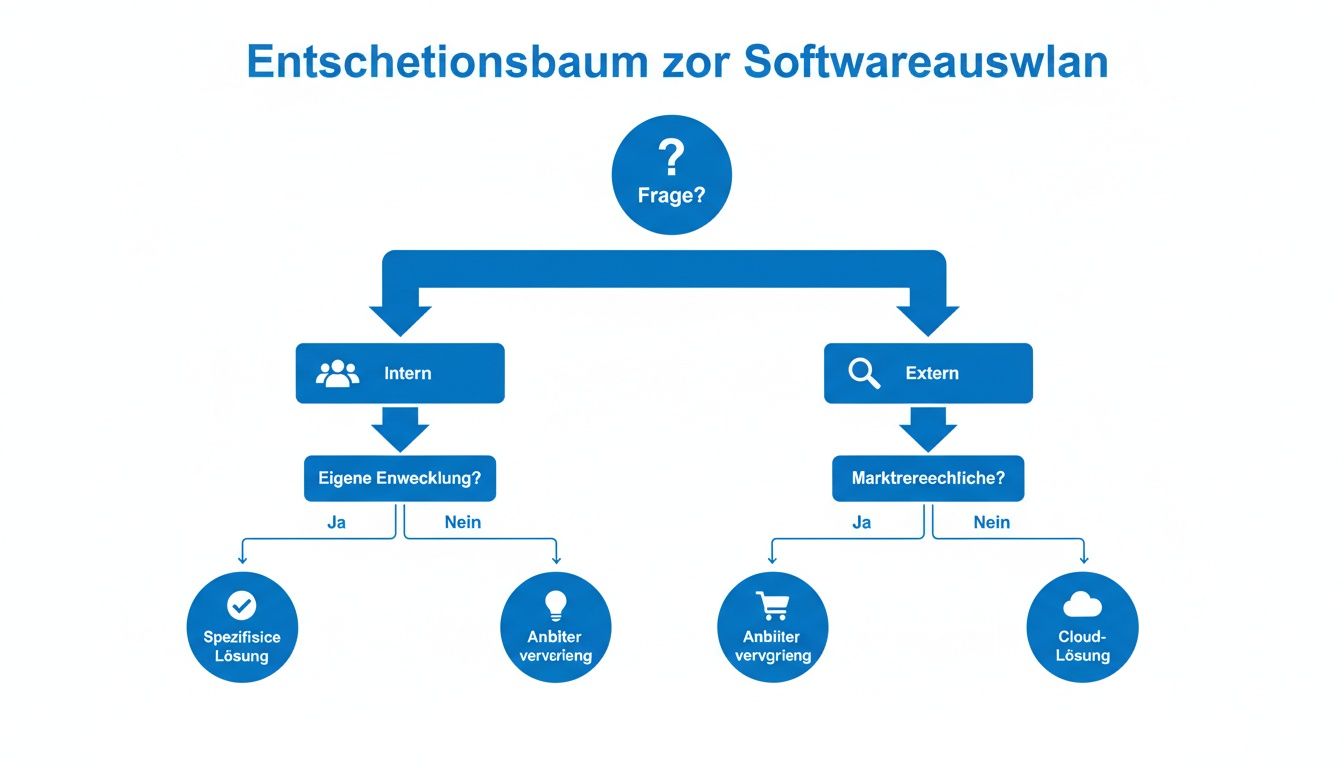
For most management companies, the path is clear: an external, specialised solution is implemented faster and brings proven expertise straight to your business.
1. Communication: Centralisation and channel bundling
The biggest operational hurdle in daily business is fragmented communication. Emails land in one inbox, calls are recorded in notes, letters need to be scanned and messages from the tenant portal must be processed separately. This not only takes time, but inevitably leads to errors and loss of information.
Truly good software works like a central inbox for the entire company. All enquiries – whether email, phone call or portal message – flow together in a single, clear workspace. Crucially, however, the software does not just collect these enquiries, but also processes them intelligently beforehand.
2. Task management and process automation
Good task management is much more than a digital to-do list. It is the heart of process-oriented management. Every enquiry must be turned into a concrete, trackable task and assigned to the right employee or service provider.
This is where the wheat is separated from the chaff:
Automatic classification: Does the software understand the content of an email? Can it automatically assign it to an issue like "water damage", the correct property and the responsible team?
Process control: Does the software trigger predefined process chains based on the enquiry? For example, instructing a contractor, including appointment coordination and subsequent invoice verification.
Deadline monitoring: Does the system actively keep track of all legal or contractual deadlines and automatically escalate when a breach is imminent?
Modern platforms act like a digital project manager. They ensure that no task is lost and that every process is tracked in a structured manner until completion. This noticeably improves service quality.
3. Document AI and intelligent analysis
Managing documents today means more than just storing them in digital folders. Contracts, minutes, invoices and correspondence contain critical information that often has to be searched for manually. This is where AI-powered solutions offer a massive advantage.
A Document AI "reads" and understands the content of your documents. For example, it can automatically extract deadlines from a tenancy agreement, summarise resolutions from AGM minutes or read relevant items from a contractor's invoice and compare them directly with the original quote.
4. Integrations into the existing system landscape
No software works in isolation. The ability to integrate seamlessly into your existing IT infrastructure is absolutely crucial – above all into your ERP and accounting system (such as DATEV, SAP etc.). Without clean interfaces, you risk duplicate data entry and error-prone manual transfers.
Make sure the provider offers standardised interfaces (APIs) and already has experience connecting to your specific system. Successful integration means that master data of tenants, properties or owners is automatically synchronised.
5. Data security and GDPR compliance
When managing property and personal data, security is the top priority. Contrary to old prejudices, a cloud solution today is often more secure than a local server in your own office – provided the provider meets the highest standards.
You should look out for these points:
Server location in Europe/Germany: This ensures that your data is subject to strict European data protection laws.
GDPR compliance: The provider must guarantee that all processes comply with the requirements of the General Data Protection Regulation.
Certifications: Quality marks like ISO 27001 are a strong indicator of a professional security architecture and established processes.
6. Onboarding and implementation effort
The best software is useless if the rollout takes months and overwhelms your team. A quick and smooth start is a critical factor for acceptance and return on investment.
Ask specifically about the onboarding process. Modern providers have highly standardised this and actively assist you with data migration and setup. Instead of a lengthy project, the goal should be to work productively within a few weeks.
7. Cost structure and Total Cost of Ownership (TCO)
Don't just compare monthly licence fees. To determine the true cost, you must look at the Total Cost of Ownership (TCO). Only then will you get an honest picture.
This includes:
One-off setup fees: Costs for initial setup and configuration.
Data migration costs: Effort to import legacy data.
Training effort: Costs for onboarding your team.
Ongoing support fees: What is included in standard support and what costs extra?
A transparent provider will be able to present you with a clear breakdown of all potential costs.
Function matrix of different software types
To illustrate the differences in practice, we compare three typical solutions on the market based on the most important criteria. This quickly shows how the concepts fundamentally differ.
Criterion | Type A (Traditional ERP) | Type B (Modern point solution) | Type C (AI platform like DoNexus) |
|---|---|---|---|
Communication | Often separate, basic email integration | Mostly focused on one channel (e.g. portal) | Fully centralised, all channels in one workspace |
Task management | Manual ticket creation, rigid workflows | Good task tracking, little automation | AI-powered classification, dynamic process control |
Document AI | None or basic OCR text recognition | Usually not present | Intelligent content analysis, extraction of data and deadlines |
Integrations | Complex, costly projects via service providers | Limited standard interfaces | Seamless connection to common systems via APIs |
Onboarding | Lengthy and cost-intensive (months) | Relatively fast, often self-service | Fast and guided (often under 4 weeks) |
Costs (TCO) | High due to licences, customisation and maintenance | Low initial costs, but scaling is often expensive | Transparent SaaS model, high ROI through efficiency |
The comparison shows: a platform like DoNexus is not just another piece of software. It acts as a central intelligence layer that complements your existing systems (such as the ERP for accounting) and elevates operational processes to a completely new level through automation and AI.
While traditional systems manage data, AI platforms actively shape value-adding workflows. To find out exactly how such transactions increase efficiency, read our Property Management Transactions Report.
Absolutely! Here is the revised version of the section, matching the style and tone of the provided examples – as if personally written by an experienced expert.
Which software really fits you?
Searching for the right property management software often feels like looking for the perfect toolbox: what is ideal for one is useless for another. The best solution always depends on your specific business field – whether you manage residential properties, commercial spaces or block management (homeowners associations). Each area brings its own distinct challenges and therefore requires different features.
Choosing the right software is thus not a question of "better" or "worse", but of fit. A system optimised for the needs of block managers will hardly help an asset manager for commercial real estate. To make the right choice, it also helps to understand the different facets of real estate management, such as the role of professional property management.
The following overview is designed to help you identify the truly decisive criteria for your use case and make a well-founded decision for your property management software comparison.
Use case 1: Management of residential properties
Those who manage residential properties deal primarily with one thing: communication with a large number of tenants. Efficiency and service quality are the key factors for success here. Particularly in markets where urbanisation and new lifestyles keep demand for rental housing high, the residential segment dominates. Manual processes for communication and deadline management quickly reach their limits here and become error-prone.
For this area, you should look for a software solution that focuses on the following key aspects:
A central tenant portal: Give tenants a single point of contact to report issues, find documents like service charge statements and view the status of their enquiries. This alone noticeably reduces the flood of calls and emails.
Automated workflow management: It gets really good when a damage report is automatically created as a task, prioritised and assigned to the right team. Clear process chains, from instructing the contractor to invoice approval, are worth their weight in gold here.
Efficient mass communication: Need to quickly inform all tenants about maintenance work? A function for simple circular letters to all or selected groups is indispensable.
Deadline and contract management: The system should automatically remind you of expiring tenancies, notice periods or upcoming rent reviews before things get tight.
For residential property managers, the ideal software is one that works as a central communication and service platform. The goal: to standardise interactions with tenants while automating internal processes as much as possible.
Use case 2: Management of commercial properties
The situation is completely different for commercial properties. Here, the focus is on asset management. Contracts are often more complex, tenants more demanding and the financial impact of individual decisions is far greater. It is less about a high frequency of small enquiries, and more about the strategic optimisation of the entire portfolio.
When choosing software, pay attention to these points:
Detailed contract management: The software must be able to map complex clauses – think of index-linked rents, turnover rents, special service charge keys or option and termination rights.
Flexible service charge management: Commercial service charge reconciliations are often a science in themselves. The system must manage different apportionment keys flexibly and ensure transparent billing for tenants.
KPI dashboards and reporting: As a commercial manager, you need key figures at a glance: vacancy rates, rent development per square metre (EUR/m²) or the weighted average unexpired lease term (WAULT). Meaningful reports for owners and investors are an absolute must here.
Use case 3: Block management (Homeowners Associations / WEG)
Block management is highly regulated by property laws. Meeting deadlines, correct implementation of resolutions and crystal-clear accounting are not just services, but legal obligations. Errors can quickly lead to expensive legal challenges.
A suitable software must therefore support you in these core areas:
Organisation of AGMs: The system should genuinely take work off your hands when creating invitations, agendas, managing proxies and minuting resolutions.
Resolution tracking and implementation: A digital register of resolutions is legally required. Even more important is task management that ensures every resolution is actually implemented with a clear deadline and responsibility.
Transparent accounts: The software must enable correct and easily understandable annual accounts for every owner, as well as the preparation of the budget. An owner portal where all important documents (deeds of covenant, minutes, statements) are available at any time builds trust.
Platforms like DoNexus pursue a flexible approach that covers precisely these different requirements. By combining a central communication workspace, AI-powered task management and intelligent document understanding, you can efficiently control both the many small enquiries in residential management and the complex, deadline-critical processes in block and commercial management. The ability to centrally bundle all operations and automate them intelligently makes DoNexus an adaptable solution for a wide range of management models.
DoNexus as the central intelligence of your property management
Choosing the right software is a strategic decision. It determines whether your team only reacts to problems or works forward-looking and efficiently. DoNexus is more than just another solution in the property management software comparison. We designed the platform as a sort of central nervous system for your entire operation. The goal: to transform manual, time-consuming tasks into intelligent, automated workflows, thereby noticeably improving service quality.
At the core is an intelligent workspace that bundles all communication channels. Emails, calls and messages from the portal flow together here and are immediately processed by the AI. Instead of an overflowing inbox, your team sees a clear list of cases – already assigned to the correct properties, processes and documents.
How tasks become efficient processes
A good system doesn't just resolve tasks, it coordinates them. This is precisely where DoNexus differs from many other approaches. We rely on a process-oriented way of working that turns reactive enquiries into structured and traceable workflows.
Let's look at how DoNexus transforms your management in 5 steps:
Central inbox and classification: Every enquiry, regardless of channel, lands in a single workspace. The AI analyses the content, detects urgency and automatically assigns the message to the right property and case – for example, "water damage in flat 12".
Automatic task creation: The enquiry instantly becomes a trackable task. Manual assignments are no longer necessary. Based on defined rules, the system directly informs the responsible employee or contractor.
Process control and deadline monitoring: The platform triggers the defined process, such as instructing a contractor. All deadlines are actively monitored. If a delay is imminent, the system automatically escalates the case.
Intelligent document linking: Relevant documents, such as tenancy agreements or old minutes, are linked directly to the case. This gives your team full context at all times, without having to search through folders.
Transparent communication: Everyone involved – tenants, owners, contractors – is kept up to date on progress. This happens automatically via the customer portal or email, significantly reducing the volume of follow-up enquiries.
Document AI as your knowledge base
One of the most important features is Document AI. Instead of just storing files, the AI analyses and understands their content. In seconds, it extracts key information, such as contract terms, resolutions from AGM minutes or deadlines from legal correspondence. This structured data extraction is a massive benefit because it makes your entire document archive searchable and usable. Learn more about how this technology works in our detailed article on Document AI from DoNexus.
DoNexus does not act like traditional software that merely stores data. It is an intelligent layer that extracts knowledge from communication and documents to actively drive processes and relieve your team of routine tasks.
Seamless integration and rapid deployment
The rollout of new software should not be a months-long project. DoNexus therefore relies on a fast, three-stage onboarding process. This ensures you feel real added value within just a few days. Seamless integrations into existing ERP and accounting systems are a matter of course, because nobody wants to maintain data twice.
In many markets, regulatory frameworks are heavily driving the demand for property management software. Compliance requirements push managers towards digital solutions, as manual processes often no longer meet data protection standards or efficiency demands. DoNexus covers these requirements cleanly: the Document AI analyses contracts, task management monitors deadlines and integrations enable a fast import of historical data.
A good management company must also be able to look after different property types, such as commercial real estate. Thanks to its flexible architecture, DoNexus adapts to the requirements of pure residential management as well as to the more complex needs of the commercial or block management sectors. Exactly this combination of central intelligence and simple scalability makes DoNexus a future-proof choice for any modern property management business.
Frequently asked questions on software comparison
Anyone thinking about new property management software usually quickly has a notepad full of questions. And rightly so, because choosing a new system sets the course for years to come. We have gathered the most common questions from countless conversations with property managers and provided highly practical answers.
It is rarely just about technology. Rather, switching to a modern solution is a strategic decision. The uncertainties usually revolve around the same topics: how long does the transition actually take? Is my data safe in the cloud? What happens to my legacy documents? And what does the whole thing cost at the end of the day? Here are the honest answers.
1. How long does the implementation of new software take?
We hear this question almost every time. The answer clearly depends on which software type you choose.
Traditional ERP systems: Rolling these out can easily take several months. Often, extensive customisations and long training phases are needed, which can slow down normal operations.
Modern cloud platforms: The process is much leaner here. Providers like DoNexus have standardised onboarding so that a productive start is often possible within just a few weeks.
Intelligent tools for data import and guided setup processes make all the difference here and vastly shorten the time to actual deployment.
2. Can my legacy data be migrated?
Yes, this is usually possible – and should be a knock-out criterion for you. Modern providers provide interfaces (APIs) and easy-to-use import tools for this. This allows master data such as properties, contacts or tenancy agreements to be migrated smoothly from the old system.
Be sure to clarify this point in your very first conversation. A reputable provider will show you exactly how the data migration works and which formats they support. Also ask specifically about migrating legacy documents. This can save you hundreds of hours of manual work.
3. Are cloud solutions secure and GDPR-compliant?
Concerns about data security are absolutely justified. The good news: professional cloud solutions today often offer higher security than a local server in your own office, which might not always be up to date. Providers with server locations in Europe are subject to strict rules and are fully GDPR-compliant.
Look out for these three features:
Server location in Europe: This ensures your data is subject to strict European data protection laws.
Certifications: A certification like ISO 27001 is not a marketing gimmick, but proves a professional security architecture and established processes to protect your data.
Transparent privacy policy: The provider must explain clearly and understandably how and where your data is processed.
4. What costs do I really have to expect?
The price of software is more than just the monthly licence fee. To compare fairly, you should always look at the total cost – the so-called Total Cost of Ownership.
In addition to ongoing fees, one-off costs may arise for the following items:
Onboarding and setup: Support to set up the system cleanly.
Data migration: The effort to transfer your existing data.
Custom training: Specific workshops for your team, if needed.
A transparent provider lists all potential costs clearly in the quote. Ask specifically about the total investment required for the first year. This avoids unpleasant surprises. In the end, investing in the right tool quickly pays off through the time saved.
Once these questions are settled, it's about putting theory into practice. A platform like DoNexus was developed from the ground up to address exactly these concerns – with fast onboarding, guaranteed GDPR compliance and a transparent cost structure. Experience for yourself how an AI-powered platform noticeably relieves your business. Discover more at https://www.donexus.ai.

Daniel Parak
Founder & CEO
Latest Posts
Discover more posts on our blog